Is there a way to view all baseline values of an attribute (for example "object text") for a specific view? |
Re: All baseline values of an attribute in current view |
Re: All baseline values of an attribute in current view rain_bow - Fri Feb 03 10:31:41 EST 2012 I know that it'll be in that way, but I just need a start, in more details... |
Re: All baseline values of an attribute in current view
The "Current Version" is easy, plow through the History of the object looking for a "modifyAttr" HistoryType that applies the attribute in question, then use the (hst.oldValue) to get what the value was before the 1st change, which is the same as when it was baselined. If there is no such History then there was no change, and it seems to me you would prefer to display nothing.
string DesigDesired = "0.1" // Display value from this baseline
string NameAttr = "Object Text" // Display this attr Value

Baseline bl, blFound = null
ModName_ mn = module(current Module)

ModuleVersion    mv
string BlVersion
for bl in (current Module) do
{  mv = moduleVersion(mn,bl)
   BlVersion = versionString(mv)
   print BlVersion "\n"
   if (BlVersion == "0.1") then blFound = bl
}
if (!null blFound) then {}// load the baseline and proceed.
|
Re: All baseline values of an attribute in current view ozguraltay - Fri Feb 03 10:58:32 EST 2012 In short - this is a DXL Layout script that will let you configure and then display any two baselines that you want to compare. So you can create multiple columns in a view, insert & configure this code so that you can see specific baseline compares. It defaults to comparing the Main Column only (Obj Text and Obj Heading) but you can alter the code to compare other attributes. You will need to read the documented instructions at the top of the script very carefully and play around with it. Paul Miller Melbourne, Australia Attachments attachment_14785993_EnhancedBaselineVersionCompare.dxl |
Re: All baseline values of an attribute in current view SystemAdmin - Sat Feb 04 17:35:09 EST 2012 Paul Miller Melbourne, Australia
I think the version of the file that Paul has posted only displayed baselined attribute values which had changed w.r.t. the Module version in which it was used. I have attached an updated version of the include file which has some improvements. As I did not want to alter the original routine syntax, you will find a few global variables which you can use to alter the layour column's behaviour. #include <../layout/include/versionCompare.inc> versionCompare__displayAllObjects = true versionCompare__show_attributeName = false modifications(false, false, 3, 1, "L")
Attachments attachment_14786169_versionCompare.inc |
Re: All baseline values of an attribute in current view Peter_Albert - Mon Feb 06 05:26:17 EST 2012
I think the version of the file that Paul has posted only displayed baselined attribute values which had changed w.r.t. the Module version in which it was used. I have attached an updated version of the include file which has some improvements. As I did not want to alter the original routine syntax, you will find a few global variables which you can use to alter the layour column's behaviour. #include <../layout/include/versionCompare.inc> versionCompare__displayAllObjects = true versionCompare__show_attributeName = false modifications(false, false, 3, 1, "L")
That was the whole thing I need. Thank you for your support. With some modifications according to my need, this code will work for me. (It actually works :)) Thank you again... |
Re: All baseline values of an attribute in current view This sounds similar to my problem .... baseline compare uses the main column (Headings & Object Text). I would like to filter this by eliminating any object that does not have an attribute set indicating it is an requirement. Doing this manually from the Compare redline Tab if the numbers are small. Other wise we export both resulting module of the Baseline compare to Excel and run majic there. Seems it would be nice to compare baseline modules specifying a particular view? DXL the only route here ? |
Re: All baseline values of an attribute in current view Peter_Albert - Mon Feb 06 05:26:17 EST 2012
I think the version of the file that Paul has posted only displayed baselined attribute values which had changed w.r.t. the Module version in which it was used. I have attached an updated version of the include file which has some improvements. As I did not want to alter the original routine syntax, you will find a few global variables which you can use to alter the layour column's behaviour. #include <../layout/include/versionCompare.inc> versionCompare__displayAllObjects = true versionCompare__show_attributeName = false modifications(false, false, 3, 1, "L")
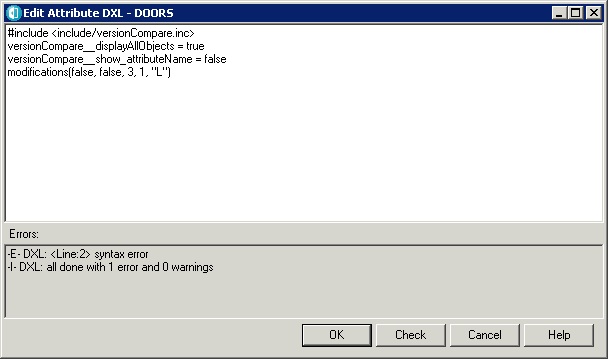
Hi Peter, I'm trying to follow the steps you left in the last version of the .inc file posted but I'm getting a syntax error on the 2nd line when copying the script to an Attribute DXL in DOORS. This is the output: -E- DXL: <Line:2> syntax error
-I- DXL: all done with 1 error and 0 warnings
This is the exact input for the DXL Attribute I use: #include <include/versionCompare.inc> versionCompare__displayAllObjects = true
versionCompare__show_attributeName = false
modifications(false, false, 3, 1, "L") Can you help me figure this one out? Thank you.
Attachments example.jpg |
Re: All baseline values of an attribute in current view CostelD - Mon Jul 29 10:12:12 EDT 2013 Hi Peter, I'm trying to follow the steps you left in the last version of the .inc file posted but I'm getting a syntax error on the 2nd line when copying the script to an Attribute DXL in DOORS. This is the output: -E- DXL: <Line:2> syntax error
-I- DXL: all done with 1 error and 0 warnings
This is the exact input for the DXL Attribute I use: #include <include/versionCompare.inc> versionCompare__displayAllObjects = true
versionCompare__show_attributeName = false
modifications(false, false, 3, 1, "L") Can you help me figure this one out? Thank you.
Any ideas guys? |
Re: All baseline values of an attribute in current view CostelD - Thu Aug 01 10:09:45 EDT 2013 Any ideas guys? This might be too obvious, but when I load the file into an editor, I see the last lines as in attached picture. seems that a carriage return sneaked into the last line. Delete line 611 Attachments 2013-08-01 18_17_39-Downloads_attachment_14786169_versionCom.png |
Re: All baseline values of an attribute in current view Mike.Scharnow - Thu Aug 01 12:19:45 EDT 2013 This might be too obvious, but when I load the file into an editor, I see the last lines as in attached picture. seems that a carriage return sneaked into the last line. Delete line 611 Oh, come ooon :)). I didn't even check till the end of the document itself, I thought it was related to the second line in the code...anyway, thank you Mike, of course that was causing the error :) Now I've got a different problem...I don't get any output in the Baseline Comparison column where I inserted this DXL Layout...nothing at all, even though the DOORS baseline compare functions shows modifications between the 2 baselines I inserted in the calls, baseline 6 and baseline 7. This is what I've inserted:
#include <include/versionCompare.inc>
versionCompare__displayAllObjects = true
versionCompare__show_attributeName = false
modifications(true, true,6,7,"L")
Am I doing something wrong here? |
Re: All baseline values of an attribute in current view CostelD - Fri Aug 02 06:07:49 EDT 2013 Oh, come ooon :)). I didn't even check till the end of the document itself, I thought it was related to the second line in the code...anyway, thank you Mike, of course that was causing the error :) Now I've got a different problem...I don't get any output in the Baseline Comparison column where I inserted this DXL Layout...nothing at all, even though the DOORS baseline compare functions shows modifications between the 2 baselines I inserted in the calls, baseline 6 and baseline 7. This is what I've inserted:
#include <include/versionCompare.inc>
versionCompare__displayAllObjects = true
versionCompare__show_attributeName = false
modifications(true, true,6,7,"L")
Am I doing something wrong here? The script does not compare two baselines, but the currently displayed version with a different baseline. Therfore,
modifications(true, true,6,7,"L")
compares the displayed module version to baseline 6.7 ("L"). If you want to cmpare baselines 6 and 7, you have to open baseline 7, add the layout DXL column there, and change the last line to
modifications(true, true,6,0,"")
assuming that baseline 6 has minor number 0 and no suffix.
Regards, Peter |